Keeping up with social media can feel like a full-time job, especially when you’re juggling everything else. That’s where the Media Library For Social Media Images and Videos inside Squirrly Social comes in. It’s a simple way to store, organize, and reuse your favorite visuals without digging through old folders or scrolling endlessly through your phone. Whether you’re planning next week’s posts or grabbing something quick for today, having all your images and videos in one place makes things faster and easier. No more wasted time—just a clear spot to keep what you need, right when you need it.
Organize Your Visual Content with Ease
Managing photos and clips for social media can take up a lot of time. Digging through folders or cloud drives just to find that one image slows everything down. With the Media Library For Social Media Images and Videos inside Squirrly Social, you don’t need to waste energy tracking down files anymore.
Everything lives in one place. You upload your visuals once, and they’re ready whenever you need them. No more guessing where things were saved last week or trying to remember file names. This setup works well when you’re juggling multiple tasks or switching between projects during the day.
When you use the Post Groups feature in Squirrly Social, pairing content with visuals becomes quicker too. Each group can be linked to specific types of posts—like promotions, tips, updates—or even different platforms. That way, your images and videos stay matched with the right message every time.
You can also reuse your best-performing content without it feeling old. The Evergreen 2.0 system helps keep things fresh by rewriting captions using AI while pulling from your stored media files automatically. So even when posts go out on repeat, they still feel new.
This kind of structure means fewer steps each week when planning posts for Facebook, LinkedIn, Twitter (X), and Instagram. Everything is already sorted inside the tool—no extra downloads or uploads needed.
Instead of spending hours organizing folders outside your scheduler, let this built-in system handle it for you as part of your regular workflow in Squirrly Social. It’s not just about saving time—it’s about making space for other parts of running your business that need attention too.
Having all photos and videos neatly arranged cuts down on errors like using an outdated graphic or repeating visuals by accident. You always know what’s available because it’s all right there where you’re already working on post creation inside Squirrly Social itself.
Media Library For Social Media Images and Videos
The Media Library For Social Media Images and Videos inside Squirrly Social helps keep everything in one place. You can upload photos, short clips, or even longer videos directly into your account. Once added, these files stay there for future use. No more digging through folders on your laptop or searching endless cloud drives.
Each file can be sorted into different groups. This means you can organize by campaign, theme, or topic without creating a mess. If you’re sharing weekly tips or promoting services often, grouping your visuals makes it easier to find what you need fast.
Using the same image across platforms is simple too. You don’t have to re-upload each time you schedule a post. Just pick from the saved items in your library and drop them into any scheduled content. That saves both minutes and effort every week.
Squirrly Social also lets you reuse media without making posts feel stale. Its AI rewrites captions when republishing older content, so even if the photo stays the same, the message feels new each time it goes live.
This setup is helpful when you’re trying to keep branding steady across Facebook, LinkedIn, X (Twitter), Instagram, and others. Your logos stay where they belong; colors match; tone remains clear—without having to double-check every post manually.
You can also rely on this library when building Post Groups inside Squirrly Social. These groups help manage themes like promotions or behind-the-scenes moments by pulling from your stored media files directly—no extra uploads needed.
Instead of wasting hours tracking down old graphics or resizing things over and over again for different platforms, everything sits ready for action inside one tool. The system works with all other features of Squirrly Social so that planning becomes quicker—even during busy weeks with little time to spare.
Save Time with Quick Access to Past Uploads
When you’re managing social media by yourself or with a small team, every minute counts. Re-uploading the same image or video over and over can feel like a waste of time. That’s where the Media Library For Social Media Images and Videos inside Squirrly Social makes things easier.
This built-in library keeps all your past uploads in one place. You don’t have to dig through folders on your computer or search old emails to find that one graphic you used last month. Once an image or video is uploaded, it stays available for future use — no need to upload it again.
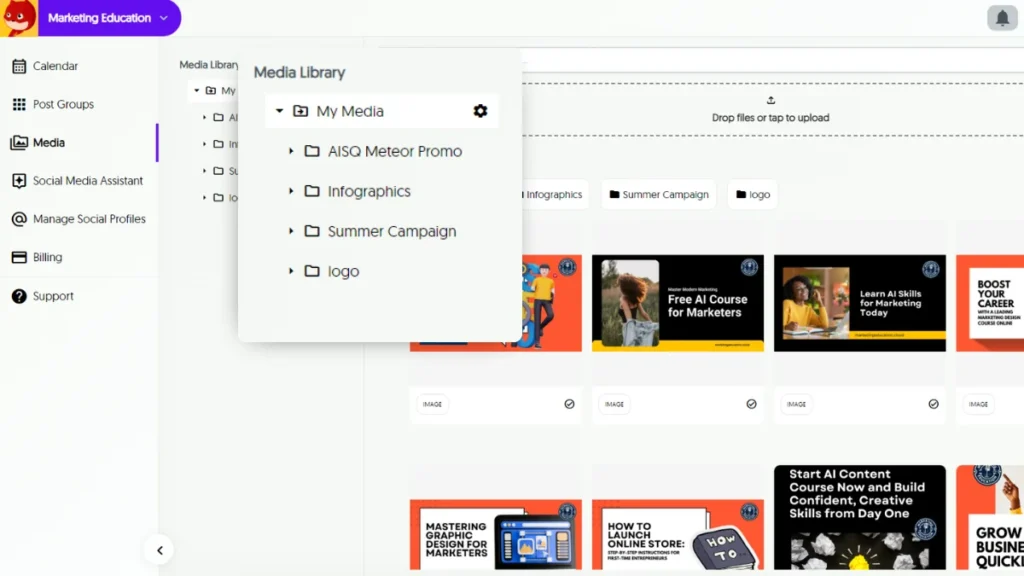
You can scroll through your collection, pick what you need, and schedule it right away. It works well when you want to reuse visuals for campaigns that run weekly or monthly. If you’re using the Evergreen 2.0 system from Squirrly Social, this becomes even more helpful. You already know your posts will repeat automatically without feeling stale because they get rewritten by AI — now your images and videos can stay on track too.
The Post Groups feature also connects with this library. So if you’ve grouped content around certain topics, finding related visuals becomes quicker. This helps keep everything organized without extra steps.
Whether you’re resharing a product demo video or bringing back a quote graphic that performed well before, having fast access makes scheduling smoother. You won’t lose time hunting down files outside the platform.
This setup supports anyone trying to stay consistent online without spending hours doing small tasks repeatedly. Instead of focusing on file management, you can focus on sharing updates and staying visible across platforms like Facebook, LinkedIn, Twitter (X), and Instagram — all from one spot inside Squirrly Social.
It’s not just about storing files; it’s about saving effort each week so posting doesn’t feel like starting from scratch every time.
Boost Collaboration Across Teams
Shared access to the Media Library For Social Media Images and Videos helps teams stay on the same page. Inside Squirrly Social, team members can upload, store, and locate visual content without needing to ask others for files. Everything is in one place—images, logos, short videos, and branded material.
When everyone uses the same library, it becomes easier to follow brand rules. No more mismatched colors or off-brand graphics. Each person works with trusted media that’s already been reviewed or used before. This keeps posts looking consistent across platforms like Instagram, Facebook, LinkedIn, or Twitter.
Squirrly Social makes this even smoother by letting you organize visuals into Post Groups. These help your team sort files by topic or campaign so they don’t waste time searching through folders or emails. Anyone with access can pull up what they need fast and move ahead with scheduling.
This setup supports small teams where people wear multiple hats. If someone is out sick or handling another task that day, another teammate can jump in using saved media from the library without delay. There’s no need for back-and-forth messages asking where assets live.
With everything stored in one central spot inside Squirrly Social’s scheduler tool, collaboration gets faster and cleaner. Fewer mistakes happen because everyone knows which version of a graphic to use—and when to use it.
When paired with automation tools like Evergreen 2.0 and AI-powered post rewriting inside Squirrly Social, shared media becomes even more useful over time. The same video clip or image can be reused without feeling stale since the captions get refreshed automatically.
Teams save hours each week by not having to recreate new visuals every time a post goes live. Instead of starting from scratch each day, they build on what’s already there—together—inside one reliable space built for speed and clarity.
Stay Organized, Save Time, and Work Smarter with Squirrly Social
With everything you’ve seen so far, it’s clear that having a well-structured Media Library For Social Media Images and Videos can make a big difference in your daily workflow. Whether you’re juggling multiple projects or working with a small team, Squirrly Social helps you stay on top of your content game without the usual stress. From quick access to past uploads to simplified collaboration and smart organization, this feature keeps your visual assets ready to go when you need them most. It’s all about making social media easier—so you can focus more on growing your brand and less on managing files.