Keeping up with social media can feel like a full-time job, especially when you’re juggling everything else. That’s where small features can make a big difference. With the new Emojis & URL Shortener for Social Media Planning inside Squirrly Social, it’s easier to add personality and clean links to your posts without extra effort. Whether you’re scheduling a week’s worth of content or just posting on the fly, these tools help you save time while keeping things looking sharp and on-brand. No need to jump between apps—everything’s built right in, so you can stay focused and keep your socials going strong.
Boost Engagement with Eye-Catching Emojis
Social media feeds move fast. It’s easy for posts to get ignored. Adding emojis can make your updates more noticeable. A small icon like a smiley face or checkmark draws the eye and gets people to stop scrolling.
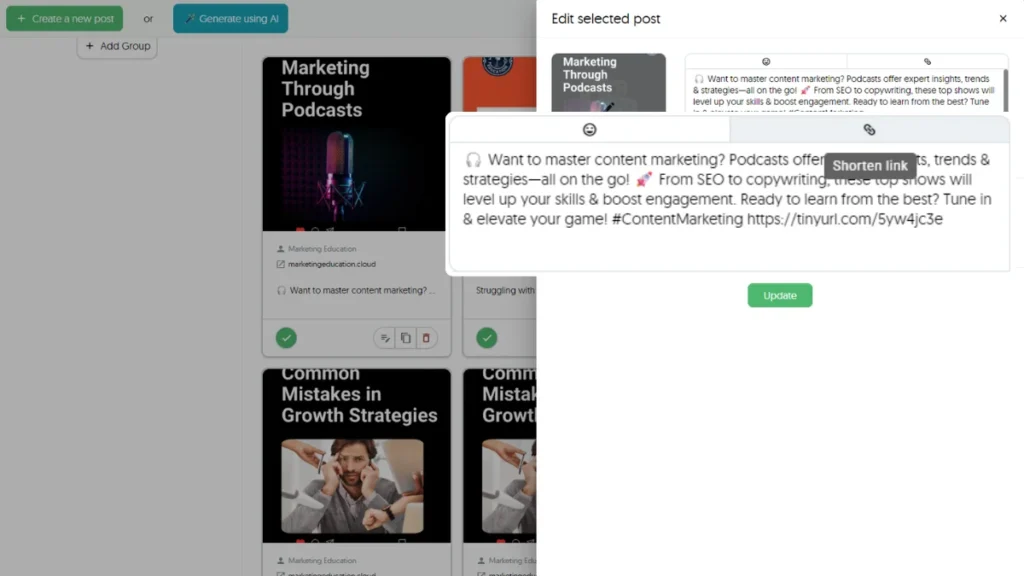
With Squirrly Social, adding emojis is quick and simple. You don’t need extra tools or websites to copy symbols from. When writing or editing a post inside the scheduler, you can insert emojis right there—no switching tabs or wasting time.
Emojis help break up blocks of text. They also show tone—whether you’re being playful, serious, curious, or excited. This helps your audience better understand what you’re saying without reading every word. It’s useful when people skim through content on their phones.
Squirrly Social makes this part smooth because it keeps everything in one place. You can write your post, drop in an emoji where it fits best, and schedule it—all at once.
Using emojis also helps build connection with followers over time. Posts look less robotic and more human when they include a fun symbol now and then. People feel like there’s someone real behind the brand.
When paired with smart scheduling features like Post Groups inside Squirrly Social, these small touches go a long way toward making your feed more engaging without needing extra effort each day.
The Emojis & URL Shortener for Social Media Planning feature lets you do both: keep posts short with clean links while making them stand out visually using icons that catch attention fast.
You don’t have to overthink which emoji works best either—the AI assistant built into Squirrly Social helps suggest ideas based on your content type or niche topic so you’re not stuck guessing what fits where.
This saves time while still helping each update feel fresh and personal—even if it’s part of an evergreen campaign running on repeat automatically through Evergreen 2.0 rewriting capabilities built into the platform itself.
Simplify Links Using the Built-In URL Shortener
Long links in social media posts can look messy. They also use up space that could be better spent on your message. That’s why Squirrly Social includes a built-in URL shortener — so you don’t have to rely on outside tools or leave your workflow.
With this feature, you can shorten any link right inside your post editor. It works while you’re scheduling, planning, or even updating past content. There’s no need to copy and paste from other services. This keeps everything in one place and saves time during the posting process.
The shortened links not only look cleaner but also help with tracking. Each time someone clicks on one of your shortened URLs, Squirrly Social logs that action for you. These click numbers help show what kind of content gets attention from your audience.
For solopreneurs and small teams who manage their own marketing, this makes things easier. You won’t need extra tools to keep track of link performance anymore. It all happens within the same system where you’re already writing and organizing posts.
When using Evergreen 2.0 to recycle older content, the short links stay active and updated too. So even if a post is shared again later through automation, it still looks neat and performs well across platforms like Facebook, X (Twitter), LinkedIn, or Instagram bios.
This is part of how Emojis & URL Shortener for Social Media Planning helps make online posting more efficient without adding steps to your routine.
Instead of worrying about how a long link affects the look or flow of a caption, you can focus on what matters: sharing useful resources or promoting offers in a way that’s easy for people to follow.
Shortened URLs also fit better alongside hashtags or emojis — making posts easier to read at a glance while keeping them under character limits when needed.
Squirrly Social gives you these tools right where they’re needed most — inside your everyday content planning process.
Streamline Your Workflow with One-Click Features
Switching between tools to add emojis or shorten links can slow down your process. With Squirrly Social, you don’t need extra tabs or apps. Everything happens inside the same place where you plan your posts. This makes it easier to stay focused and get things done faster.
When writing a post, you can drop in emojis without leaving the screen. No need to copy from another site or search for that perfect symbol somewhere else. The emoji picker is right there when you need it. It helps your updates feel more human and relatable—without adding extra steps.
Shortening links works just as easily. Instead of heading to a separate URL shortener, Squirrly Social lets you do it with one click while scheduling content. This keeps your links neat and saves space in character-limited platforms like Twitter (now X). You also avoid long, messy links that distract from the message.
These small time-savers make a big difference when you’re managing multiple posts across different channels. Whether you’re planning out a week’s worth of content or working on daily updates, fewer clicks mean less stress and more time for other tasks.
The Emojis & URL Shortener for Social Media Planning feature fits right into how people already use Squirrly Social’s scheduler. Since everything is built-in, users don’t have to learn new systems or change their habits—it simply works better than juggling five browser tabs at once.
By keeping all these tools under one roof, Squirrly Social helps reduce distractions during content creation. It removes unnecessary steps so users can focus on what really matters—sharing useful posts that keep their audience engaged day after day.
Over time, this adds up to smoother days and fewer delays when posting online across platforms like Facebook, LinkedIn, Instagram, and X—all without burning out from constant switching between apps or services.
Perfect for Every Platform
Every social platform has its own way of handling posts. Facebook lets you go longer with your text. Twitter keeps things short. Instagram leans more on visuals and emojis, while LinkedIn prefers a clean, professional tone. That’s where the Emojis & URL Shortener for Social Media Planning feature in Squirrly Social comes in handy.
This feature helps match your message to each platform without extra steps. You can add emojis that fit the tone of your post—fun ones for Instagram or casual updates on Facebook. On LinkedIn, you might pick one or two simple icons to keep it neat without losing appeal. With Squirrly Social, you don’t have to guess what works best where.
The built-in URL shortener also helps every post look cleaner and take up less space, especially on platforms like Twitter where character count matters most. Long links can distract from your message and even look messy across different apps. With this tool, those links get trimmed down automatically when you schedule content through Squirrly Social.
You don’t need to switch tools or copy-paste into another app just to shorten a link or find an emoji that fits the mood of your post. It’s all ready inside the scheduler itself—no tabs open, no time wasted.
When you’re trying to stay visible online without spending hours planning every word or emoji choice, these small features save real effort over time. They help shape messages that feel right for each space online—without needing a guidebook on how each platform works.
Squirrly Social takes care of these details so you don’t have to double-check every update before it goes live. Whether you’re writing something light-hearted for Instagram Stories or sharing a business tip on LinkedIn, this makes sure everything looks just right when it lands in front of people who follow your brand across different networks.
Track Performance with Smarter Links
When sharing links on social media, long URLs can look messy and take up space. With Squirrly Social, you don’t need to use outside tools to fix this. The built-in link shortener helps keep your posts clean and easy to read. But it’s not just about making things look better — these shorter links also give you helpful data.
Each time someone clicks a shortened link from your post, Squirrly Social tracks that click. You get access to numbers like how many people opened the link and when they did it. This means you can see which posts bring the most traffic without guessing or switching between platforms.
If you’re using the Emojis & URL Shortener for Social Media Planning, you’re already saving time by creating more eye-catching posts. Now, with tracking built into those links, you also learn what’s working best. Maybe one emoji grabs more attention than another — now you’ll know because of the click stats tied to each version of your post.
You can test different styles of writing or change up what kind of content gets shared. If one type brings in more clicks, use that approach again in future campaigns. Over time, these insights help shape smarter strategies without needing extra effort or software.
Since everything is inside Squirrly Social already, there’s no need for copy-pasting into other apps just to shorten a URL or check performance stats later on. It all happens in one place while planning your posts — whether for today or next month. That means less juggling and more control over what works for your audience online.
Add Personality Without Losing Professionalism
Using emojis in your posts can make your brand feel more human. But doing it without looking unprofessional takes a bit of care. That’s where the Emojis & URL Shortener for Social Media Planning feature inside Squirrly Social becomes useful.
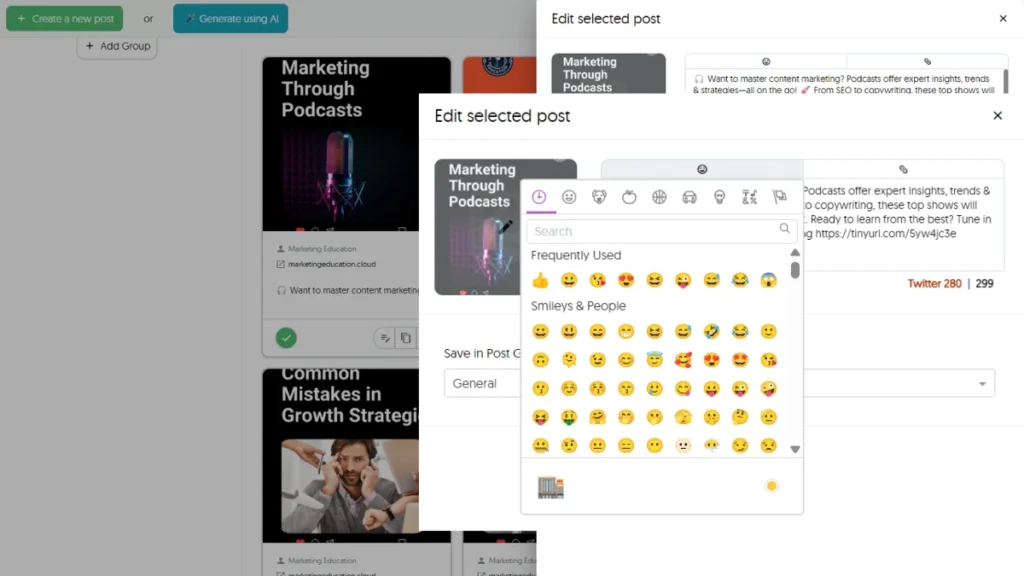
When you plan content with Squirrly Social, you can add emojis right from the editor. You don’t have to copy and paste from other websites or guess which emoji fits best. This speeds up planning and helps you stay consistent across platforms like Facebook, LinkedIn, Twitter, and Instagram.
A well-placed emoji can replace extra words. It shows tone fast—whether you’re being friendly, excited about an offer, or simply pointing out a tip. With this tool built into your scheduler, it’s easy to do that without breaking your flow or spending more time than needed.
Too many symbols might confuse people or feel off-brand. Squirrly Social lets you test different versions of posts using its Evergreen 2.0 system. The AI rewrites them while keeping the emoji use smart and balanced—so nothing feels forced or too casual.
This is helpful if you manage both personal coaching updates and business promotions on one account. You don’t need to choose between sounding relatable and sounding reliable—you can be both with less effort.
The URL shortener works alongside emojis to keep things clean and easy to follow. Long links clutter your message; shortened ones look better next to an emoji call-to-action like 🔗 or 👀.
Squirrly Social gives you tools that help shape how people see your brand online—not just once but over time as posts repeat automatically with fresh text each round thanks to AI rewriting support.
You save time while still showing personality in every post—without losing control over how professional it looks across channels where tone matters most.
Smarter Social Media Starts with the Right Tools
By combining visual flair with practical functionality, Squirrly Social’s Emojis & URL Shortener for Social Media Planning helps you create posts that not only stand out but also perform better. With built-in tools that let you add emojis effortlessly, shorten links in a click, and track engagement—all while keeping your workflow smooth—you can finally focus on what matters most: staying visible without burning out. Whether you’re posting to Instagram, Facebook, LinkedIn, or Twitter/X, this feature keeps your content sharp and consistent. It’s one more way Squirrly Social makes social media automation smarter for busy creators like you.