Keeping up with social media can feel like a full-time job, especially when you’re juggling everything else. That’s where Collaboration Features for Social Media Management in Squirrly Social really come in handy. Whether you’re working solo or with a small team, these tools help you stay organized, delegate tasks, and keep your content flowing without the usual back-and-forth. You don’t need to be glued to your screen every day—Squirrly Social makes it easier to plan ahead and share the load. If staying active online feels like too much lately, this might be just what you’ve been looking for.
Team Roles and Permissions
Squirrly Social makes it easier to manage your team by giving you control over who can do what. With its role-based system, you can assign different levels of access to each person on your team. Instead of letting everyone see or change everything, Squirrly Social helps you set clear boundaries.
For example, if someone only needs to schedule posts but not edit them, you can give them just that ability. If another teammate handles content creation but doesn’t need access to analytics or publishing tools, you can limit their view accordingly. This cuts down on confusion and keeps things more organized.
It also helps keep your brand voice steady. By limiting editing rights to only a few people, there’s less chance of off-brand messages going out by mistake. You get better control over what gets posted and when—without needing constant check-ins or long approval chains.
This setup works well for small teams where each person has a specific task. It saves time because no one has to dig through features they don’t use. Plus, it reduces errors since users won’t accidentally change something they shouldn’t touch.
These role settings connect smoothly with other Collaboration Features for Social Media Management in the platform. When paired with Post Groups and automated scheduling, the permissions help keep things running without extra meetings or emails.
Squirrly Social was built with busy teams in mind—those juggling multiple jobs at once but still wanting consistency online. By using roles and permissions wisely, teams avoid overlap and stay focused on their parts of the process. Everyone knows where they fit in—and that leads to fewer mix-ups along the way.
With this kind of structure in place, even a two-person team can feel like they’re working at full strength without burning out trying to manage everything manually every day.
Shared Content Calendar
The shared content calendar in Squirrly Social gives everyone on your team one clear place to see all planned posts. You don’t need to jump between tools or scroll through endless chats to check what’s going live and when. This single view helps you keep track of your content without confusion.
When multiple people handle social media, things can get messy fast. Someone might schedule a post that overlaps with another, or you might forget an important campaign altogether. The shared calendar cuts down those problems. Each person sees the full lineup—what’s been scheduled, what still needs approval, and which days look empty.
This tool supports better teamwork by showing real-time updates. If someone changes a post time or adds new content, others see it right away. It keeps everyone informed without needing extra messages back and forth.
You can also spot gaps quickly in your posting schedule. That way, no platform goes quiet for too long. Whether you’re planning weekly updates or looking at the month ahead, everything is lined up visually for easy review.
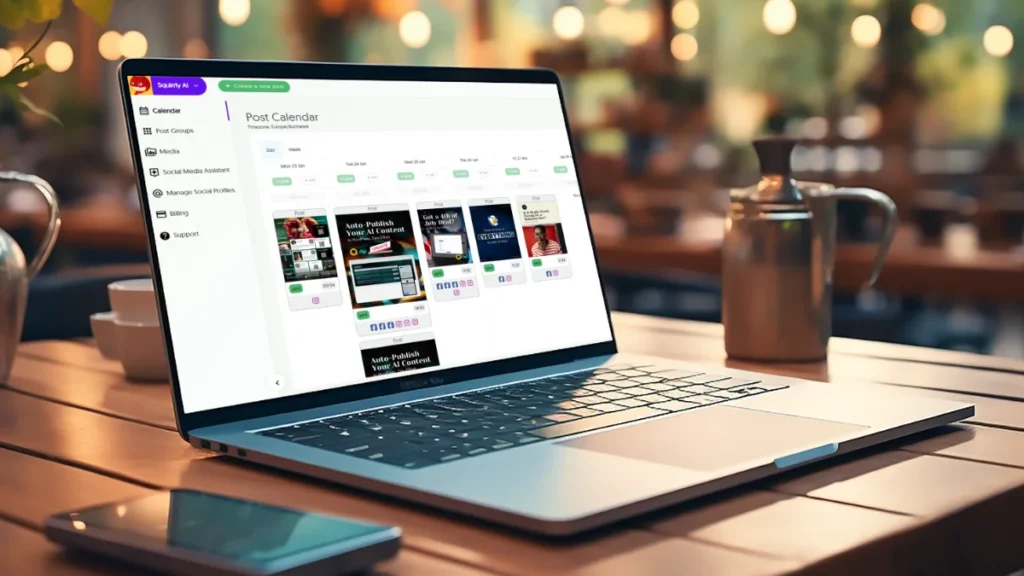
For solopreneurs working with freelancers or marketers managing small teams, this feature saves time and avoids repeat effort. You won’t accidentally create duplicate posts because the plan is already laid out clearly.
Squirrly Social makes this even easier by linking its AI features directly into the calendar workflow. When using Post Groups and Evergreen 2.0 together with the calendar, you can set up smart schedules that repeat as needed but always feel fresh thanks to automatic rewrites.
Among all Collaboration Features for Social Media Management, having a shared view like this makes coordination smoother across roles—even when there’s only one person doing it all but switching hats throughout the day.
With everything visible at once, staying organized becomes less stressful and more manageable day-to-day.
Collaboration Features for Social Media Management
Working with others on social media tasks can be tricky when tools don’t support teamwork. Squirrly Social helps by offering features that let teams create and manage content together in real time. When several people need to post updates, plan campaigns, or check drafts, it’s easier if everyone can see and edit the same thing at once. This tool makes that possible.
With shared access, users can log into a single workspace and start drafting posts without confusion. There’s no need to email files back and forth or wonder who made changes last. Each team member can view the calendar, suggest edits, or approve content directly inside the platform. These Collaboration Features for Social Media Management keep things moving smoothly without extra steps.
One key part of this setup is how teams can organize their posts using Post Groups. This lets users sort content by topic or campaign so everyone knows what belongs where. It also helps avoid mistakes like posting something twice or forgetting a scheduled update.
Squirrly Social also supports approval workflows. A team member might write a draft while someone else checks it before publishing. That way, nothing goes live without a second look—useful when working with clients or managing brand voice across channels.
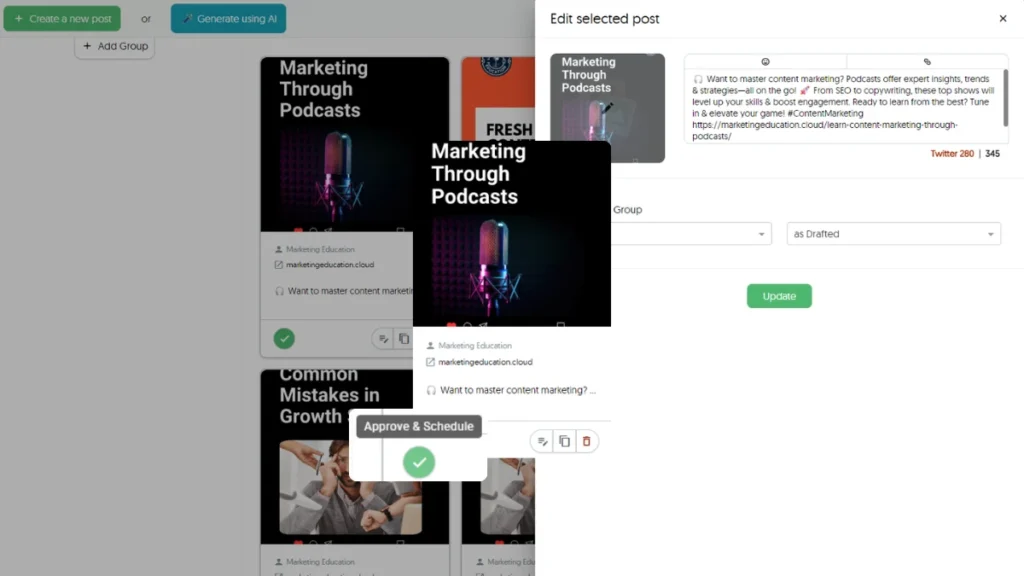
Since all these actions happen in one place, there’s less room for error and fewer delays between planning and posting. Teams stay informed through notifications about changes or upcoming schedules.
These tools don’t just make collaboration possible—they make it efficient for small groups trying to stay active online while dealing with other responsibilities too.
Internal Notes and Feedback Tools
Squirrly Social makes it simple for teams to share thoughts on post drafts right inside the platform. Each draft has a built-in space where teammates can leave notes or ask questions. This helps avoid long email chains or switching between apps just to get feedback. You don’t need to copy links into chat groups or wait hours for someone to respond elsewhere.
The comment section sits directly beside every draft, so everyone sees the same thing at once. Whether it’s a quick thumbs-up, a rewrite suggestion, or an edit request, all replies stay with the content. This keeps everything easy to follow and reduces confusion over which version is final.
For small teams juggling many tasks, this tool saves time. Instead of chasing approvals across platforms, users can respond quickly and move forward without delay. Approving posts becomes smoother because all updates happen in one place—no more endless back-and-forths.
This feature also supports better teamwork without needing extra software. As part of Squirrly Social’s Collaboration Features for Social Media Management, internal notes help everyone stay on track without slowing things down.
Combined with other features like Post Groups and AI-powered scheduling, this tool fits naturally into your daily flow. There’s no steep learning curve or setup process needed for using comments—just open a draft and type what you think.
Whether you’re working with one teammate or two others helping out occasionally, these tools reduce stress by keeping communication direct and tied to each post. You save time while staying organized across campaigns.
When every second counts during busy weeks, being able to give fast feedback inside your scheduler helps keep social media moving without bottlenecks.
Streamlining Teamwork for Smarter Social Media Management
Bringing your team together on social media doesn’t have to be chaotic or time-consuming. With Squirrly Social’s Collaboration Features for Social Media Management—like customizable team roles, a shared content calendar, and built-in feedback tools—you can stay organized and aligned without the back-and-forth. These features make it easy for small teams and solo marketers to coordinate efforts, keep content flowing, and maintain a strong online presence. By combining smart collaboration with AI-powered automation, Squirrly Social helps you save time while staying consistent—so you can focus more on growing your brand and less on managing posts.