Keeping up with social media can feel like a full-time job, especially when you’re trying to keep everything organized and on-brand. That’s where Approval Workflows for Social Media Content inside Squirrly Social come in handy. Whether you’re working solo or with a small team, these built-in features help you review, edit, and approve posts before they go live—without bouncing between tools or losing track of what’s ready to publish. It’s all about making sure your content stays clear, consistent, and on schedule. Let’s take a closer look at how these workflows save time and keep things running smoothly.
Streamlined Team Collaboration
Working with others on social media content can get messy. Messages get lost. Feedback comes late. Deadlines slip through the cracks. That’s where Squirrly Social helps teams stay in sync.
Inside Squirrly Social, team members can see what everyone is working on and what needs approval next. No extra tools or back-and-forth emails needed. Everything happens in one place, so nothing gets missed.
Writers can add posts straight to a shared schedule or Post Group. Editors can jump in to review and suggest changes right there—no need to copy text into a document or ping someone for updates. Managers know which posts still need approval because it’s clearly marked inside the platform.
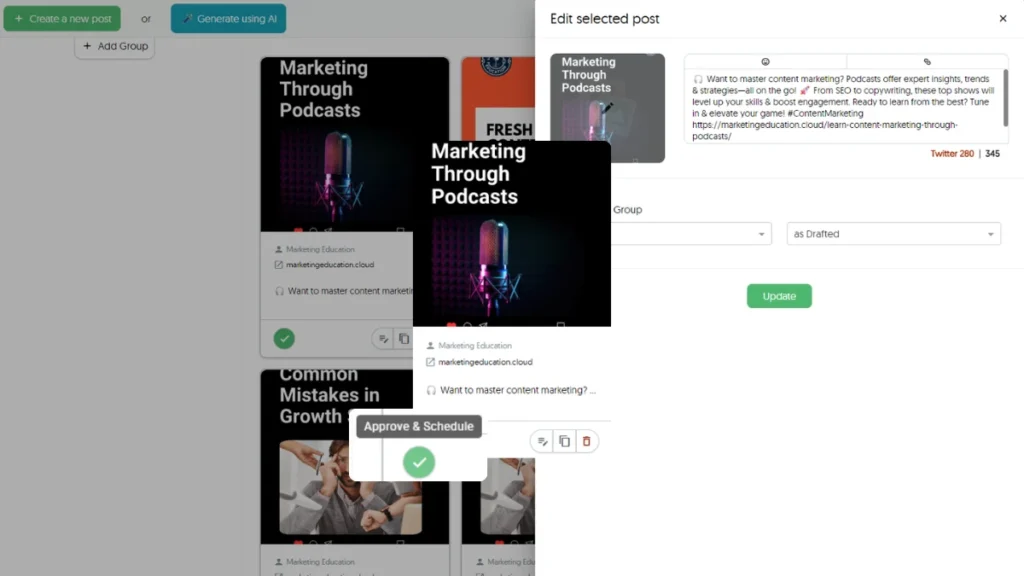
This setup keeps things moving without confusion or delays. Everyone knows when it’s their turn to take action, whether that means writing, reviewing, or approving a post.
The Approval Workflows for Social Media Content built into Squirrly Social make this even easier by showing who approved what and when. If anything needs edits before going live, it’s clear where the post stands and what step comes next.
It also saves time that might otherwise be spent tracking down files or asking about status updates across different apps. Since everything stays inside one tool, teams avoid scattered feedback and missed deadlines.
Even if your team is just two people handling all tasks—writing, editing, scheduling—this workflow helps divide those tasks without chaos. With fewer steps and better visibility into progress, keeping your social presence active becomes much simpler.
Squirrly Social makes sure each person knows their role in getting content ready to publish—and lets them do it without wasting time switching between platforms or waiting for replies elsewhere.
Approval Workflows for Social Media Content
Using social media to promote your business takes time and focus. When posts go out with mistakes or off-brand messages, it can hurt trust. That’s why checking content before it gets published is important. Inside Squirrly Social, the Approval Workflows for Social Media Content feature helps solve this issue in a simple way.
This workflow lets you set up a clear review process for each post. Before anything goes live, someone on your team can double-check the message, links, hashtags, and tone. If something feels off or needs updates, they can send it back for changes. This keeps everyone on the same page without needing constant back-and-forth emails or chat threads.
For small teams wearing many hats, this creates order without adding extra tasks. You don’t need to open multiple tools or keep spreadsheets of what’s been reviewed and what hasn’t. The approval steps happen right inside Squirrly Social as part of your usual scheduling flow.
It also works well if you’re using AI-generated posts from Next Level Marketing AI within Squirrly Social. Even though the AI writes helpful drafts based on your niche and goals, having a human check them ensures they match your brand voice before hitting publish.
This system stops rushed content from slipping through and helps avoid last-minute stress when managing several accounts at once. Whether you’re working solo or sharing duties with one other person, this kind of structure brings clarity to daily posting routines.
With features like Post Groups already helping organize topics by theme or campaign, adding approvals gives another layer of control—without slowing things down too much. You still get speed from automation but gain peace of mind knowing that every post passes through careful eyes first.
No matter how busy your week gets or how many platforms you’re juggling at once, this built-in process makes sure everything looks right before your followers see it online.
Customizable Approval Steps
Every team works a little differently. Some people handle everything solo, while others split tasks between content creators, editors, and final approvers. That’s why having flexible review steps matters when managing social media posts. Inside Squirrly Social, users can set up Approval Workflows for Social Media Content that match how their team actually works—no extra steps, no confusion.
Let’s say you want one person to write the post and someone else to give it a final check before it goes live. You can assign those specific roles in the workflow settings. If your flow needs more than two sets of eyes before publishing, no problem—you can add more levels of review. This makes it easy to prevent mistakes or off-brand messaging from slipping through.
Each step in the process is clear and organized. Team members know what they’re responsible for and when it’s their turn to act. This helps move things along faster without sending emails back and forth or checking who did what last.
Squirrly Social keeps everything inside one place so there’s no need for outside tools just to approve a tweet or Instagram caption. Once someone finishes their part, the next person gets notified automatically. It keeps everyone on track without micromanaging anyone’s time.
For small teams juggling multiple tasks each day, this kind of control saves effort and avoids confusion. You don’t need to guess if something was approved or wait hours for an answer—everything is visible within the platform.
This level of customization supports both quick turnarounds and careful reviews depending on your needs that week—or even that day. Whether you’re working alone or with two others helping out part-time, these approval settings can adjust as needed without slowing down your schedule.
By making approval steps simple but flexible, Squirrly Social gives users space to focus more on planning smart content instead of chasing feedback across different apps or chats.
Real-Time Notifications and Updates
Squirrly Social makes it easy to stay in the know. When a post is waiting for review, you get notified right away. As soon as someone gives feedback or hits approve, everyone involved gets an update. There’s no need to chase people down or wonder where things stand.
These alerts show up instantly, so nothing slips through the cracks. If you’re working with a teammate or client, they’ll see exactly when something needs their attention. You don’t have to send follow-up emails or reminders anymore—Squirrly Social handles that part.
This keeps your process moving without delays. Instead of checking back every hour to see if a post was reviewed, the system tells you as soon as it’s done. That means less waiting around and more time for other tasks.
If you’re juggling multiple projects, this can help cut down on confusion too. Everyone knows what’s been approved and what still needs a look. It helps avoid double-checking or redoing posts by mistake.
With Approval Workflows for Social Media Content, these real-time updates play an important role in keeping things organized and timely. Each person involved sees only what they need when they need it—no clutter, just clear next steps.
For those using Squirrly Social’s AI-powered scheduling features like Post Groups or Evergreen 2.0, fast notifications mean content keeps flowing without hiccups. You can trust that once something’s ready to go live, it won’t sit waiting in limbo because someone missed an email.
Even if your team is small—or just you—the system supports quick decisions without extra tools or back-and-forth chats outside the platform. Everything stays in one place, making approvals simple and quick to handle whenever needed most.
Post History and Audit Trail
Keeping track of edits, comments, and approvals can get messy fast—especially when multiple people touch the same post. That’s where Squirrly Social steps in with its built-in Post History and Audit Trail. Every time someone edits a post or leaves feedback, it gets logged. You don’t have to dig through emails or chat threads to figure out who made what change.
This feature is helpful for small teams managing their social presence together. When one person writes the draft and another approves it later, everything is visible in one place. The platform shows you exactly when a post was created, reviewed, updated, or scheduled. That way, nothing slips through the cracks.
If someone on your team changes the wording of a caption or updates an image before publishing, those adjustments stay recorded. You can go back at any time to see earlier versions without guessing what got changed or why it happened. This makes it easier to catch mistakes early—or restore something that worked better before.
The audit trail also supports Approval Workflows for Social Media Content by making every step transparent. Whether you’re approving content yourself or working with teammates who give input along the way, everyone stays in sync without extra back-and-forth.
Squirrly Social keeps all this information tied directly to each post inside your dashboard. No need to switch between tools just to check progress or confirm approval status. For solopreneurs juggling tasks—or small teams trying not to miss deadlines—this saves both time and confusion.
The best part? You don’t have to remember every detail yourself because Squirrly Social does that job for you automatically while you focus on planning smarter content strategies using features like Post Groups and Evergreen 2.0 scheduling systems that keep your feed full without repeat fatigue.
Integrated Calendar View
Squirrly Social includes a calendar that shows your full content schedule in one place. You can see what posts are planned, when they will go live, and which ones still need approval. This view makes it easy to follow the flow of your social media tasks without switching between tabs or tools.
When you’re managing posts across different platforms, things get messy fast. The calendar inside Squirrly Social helps you avoid mistakes by showing each post’s status clearly. You’ll know right away if something is waiting for review or already approved. This prevents missed deadlines or accidental publishing of unapproved updates.
The built-in calendar works well with how Approval Workflows for Social Media Content operate in Squirrly Social. If you’re part of a small team or doing everything yourself, you don’t have time to check every detail over and over again. With this feature, all the key info is right in front of you—approval stage, publish date, and platform.
You can drag and drop posts on the calendar to reschedule them quickly if priorities change. If a post needs edits before it goes out, just click into it from the calendar view and make changes directly there. No need to dig through folders or menus.
This setup reduces confusion between team members too. Everyone sees the same timeline with up-to-date statuses so no task slips through the cracks. It supports smoother planning since you’re always aware of what’s coming next—and what still needs attention before going live.
Instead of reacting last minute, this layout gives space to plan ahead while staying organized at every step. When paired with features like Post Groups and Evergreen 2.0 inside Squirrly Social, it becomes easier to keep content flowing without extra stress or long hours spent checking progress manually each day.
Simplifying Social Media Collaboration Without the Overwhelm
Managing social media shouldn’t feel like a full-time job—especially for small teams and solopreneurs. With features like customizable approval steps, real-time notifications, and an integrated calendar view, Squirrly Social makes Approval Workflows for Social Media Content both intuitive and efficient. The platform empowers teams to collaborate smoothly, track post history with ease, and stay aligned without constant back-and-forth. By streamlining the entire process through automation and smart organization, Squirrly Social helps you stay consistently active online—without burning out. It’s a powerful ally for anyone looking to keep their content fresh, approved, and always on schedule.